CUDA Micro-benchmarks in Practice (Part 1): From Source and SASS to an Nsight Compute Evidence Chain
GPU performance analysis needs a complete evidence chain:
|
|
Source alone does not tell us which instructions execute. Stall reasons alone can turn normal waiting into a false bottleneck. This article starts from compiler output, builds a Warp scheduling model, and then presents a top-down Nsight Compute workflow. Part 2 uses this evidence chain to design concrete micro-benchmarks.
1. How Does CUDA Source Become GPU Instructions?
A .cu file contains both Host and Device code. nvcc is a compiler driver: it separates the two, sends Host code to the platform C++ compiler, compiles Device code into PTX or architecture-specific cubin, packages Device images into a fat binary, and participates in Host linking.
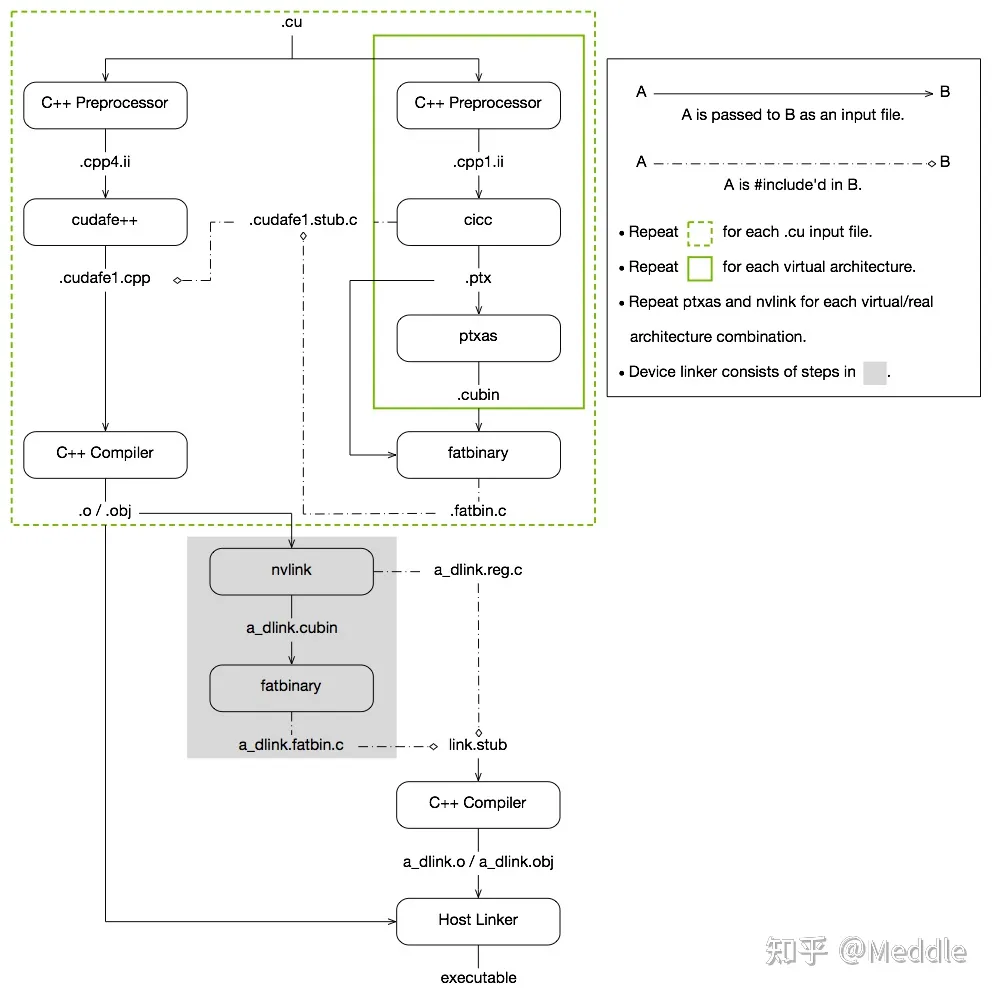
Read the figure as three paths:
- Host path: preprocessed Host C++ is compiled into
.o/.obj. - Device path: Device code becomes virtual-ISA PTX and then architecture-specific cubin through
ptxas. - Packaging/linking: fatbinary may contain multiple cubins and PTX for Driver JIT when no matching cubin is available.
PTX is a virtual instruction set useful for inspecting compiler intent. SASS is the machine code executed by the target GPU. Performance conclusions must ultimately be grounded in SASS.
1.1 Generate and Extract PTX/SASS
Generate standalone PTX:
|
|
Build optimized target code and preserve intermediates:
|
|
Extract images from an executable or library:
|
|
Analyze a standalone cubin with control-flow information:
|
|
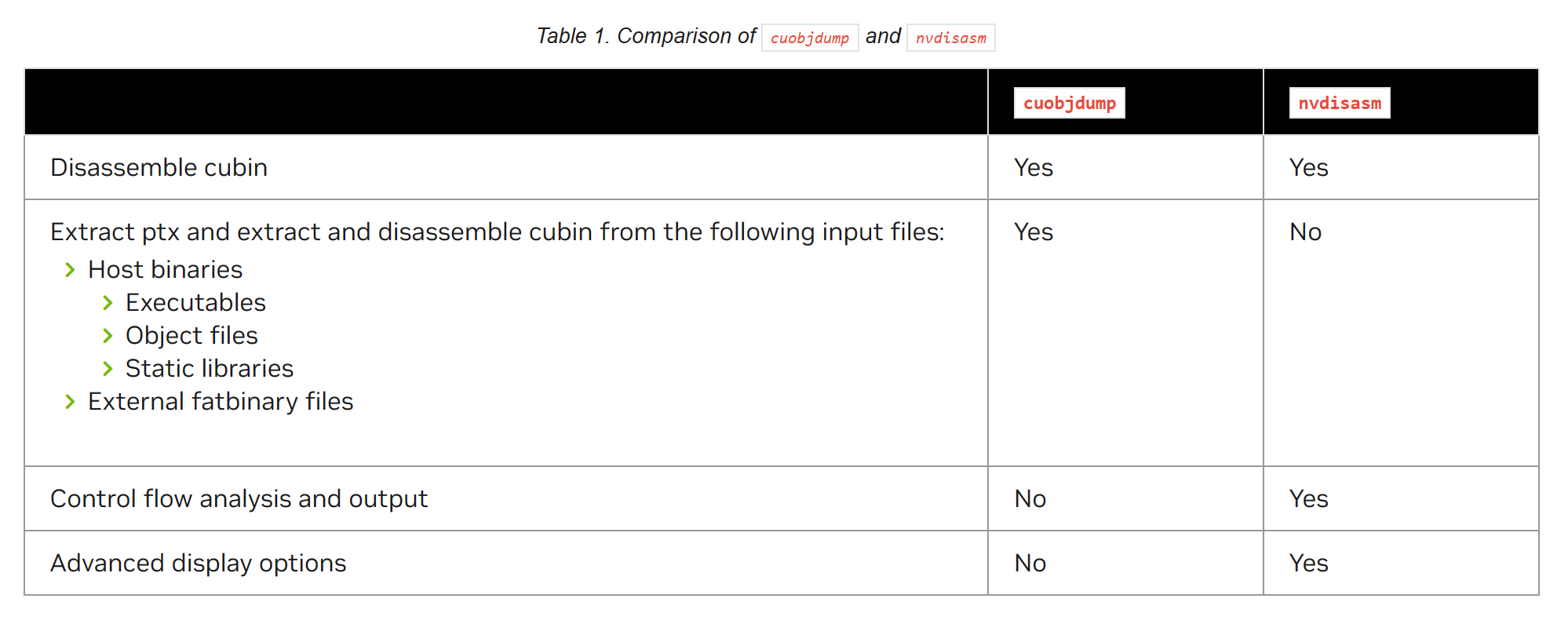
Other useful tools:
cu++filt: demangles C++ symbols.nvprune: removes unneeded GPU architectures from objects/libraries.- NVBit: an independent NVLabs SASS instrumentation framework, not a built-in CUDA Toolkit command.
1.2 Do Not Disable Optimization by Default
A performance benchmark should measure optimized code similar to production. Disabling optimization changes register allocation, instruction selection, loop structure, and memory behavior.
Prevent dead-code elimination by:
- writing results to observable memory;
- validating them on the Host;
- using
asm volatileonly when a short sequence must be pinned; - checking PTX/SASS to verify the target loop and instructions.
-O3 primarily controls Host optimization; Device optimization is enabled by default when -G is absent. Use -lineinfo for source-level profiling. Do not substitute -G, which significantly changes Device code.
2. From Launch Configuration to Resident Warps
After launch, Thread Blocks are assigned to SMs. Every 32 threads form a Warp. Concurrent block residency is constrained by:
- per-SM block/warp/thread limits;
- threads per block;
- registers per thread;
- Shared Memory per block;
- architecture-specific limits.
The resource-derived upper bound is Theoretical Occupancy. Warps actually resident during execution are Active Warps.
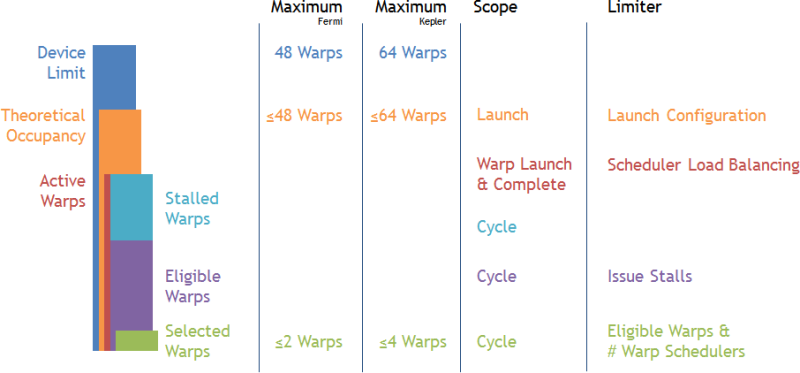
The Fermi/Kepler numbers in the figure are historical examples, not fixed limits for modern GPUs. Focus on the containment relationship:
|
|
Occupancy is potential concurrency, not performance. More Active Warps help when they hide long dependencies; they do not help when the target execution pipeline is already saturated.
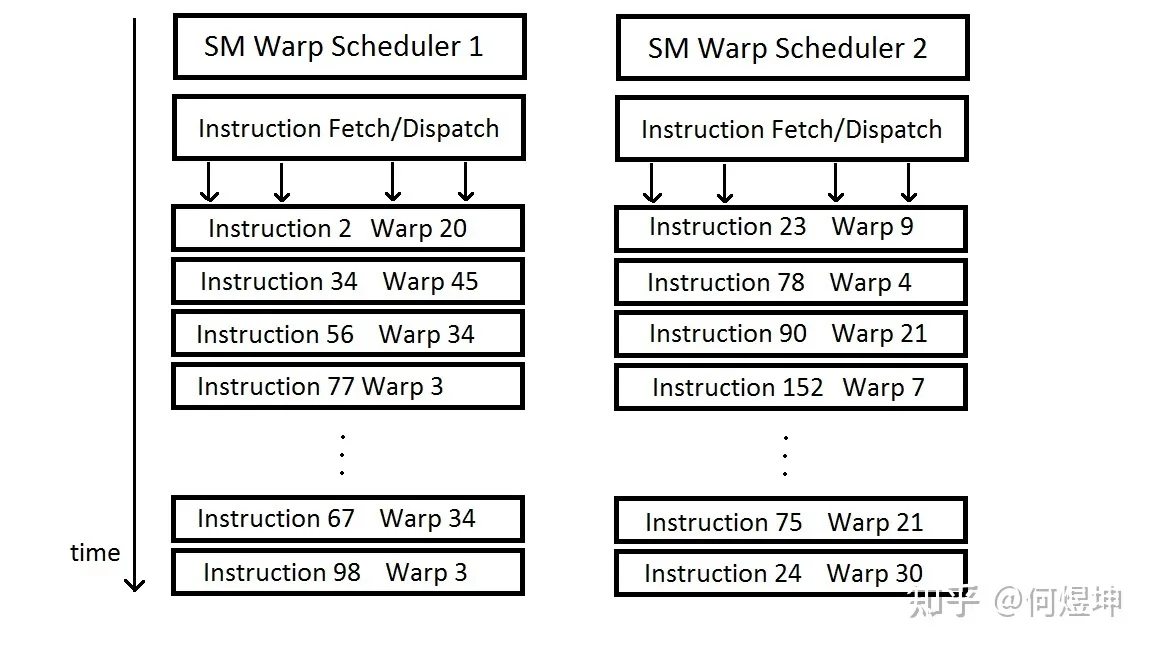
3. What Does the Warp Scheduler Actually Do?
3.1 Active, Eligible, Selected, and Stalled
Each resident Active Warp can be classified per scheduling cycle:
- Eligible: its next instruction has ready operands, resources, and synchronization state.
- Selected: an Eligible Warp chosen to issue this cycle.
- Stalled: its next instruction is waiting for a dependency, memory, barrier, or execution resource.
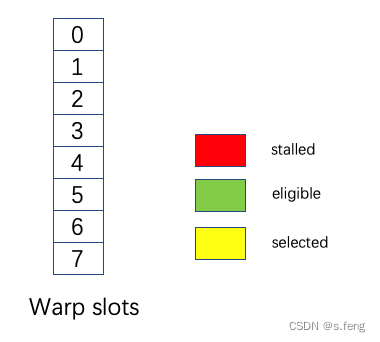
Selected is not a persistent state; it means “issued this cycle.” Hardware scheduling policy is architecture-specific and should not be assumed to follow a guaranteed Round-Robin order.
3.2 Issue Slots and Latency Hiding
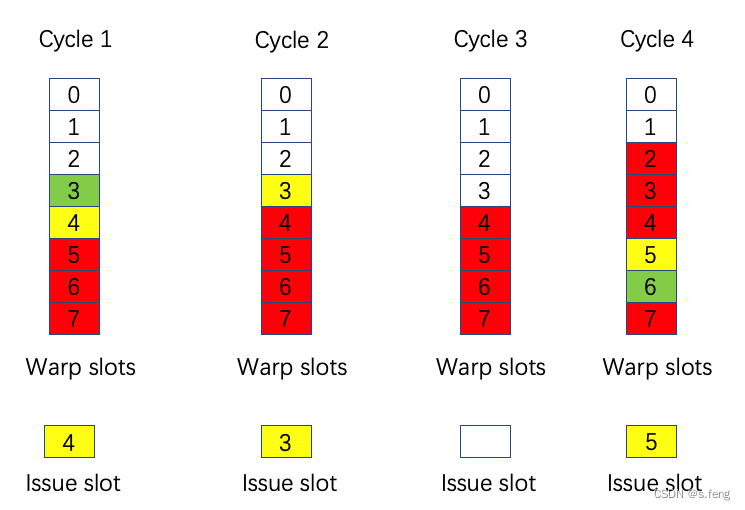
The colored cycles select one Eligible Warp. Cycle 3 has no green Eligible Warp, so the issue slot is idle. The key profiling question is not whether stalls exist, but:
Do stalls leave the scheduler with no Warp to issue, wasting issue slots?
When a Warp waits for Global Memory or a dependency, its registers, PC, and state are already resident on the SM. The Scheduler can choose another Eligible Warp without an OS-style save/restore. This switch is cheap, but latency remains exposed if all Active Warps stall.
3.3 A Modern View of Divergence
At an instruction, only lanes in the active mask participate. Divergent paths execute with different lane masks and reduce effective lane utilization. Volta and newer GPUs support Independent Thread Scheduling, so a fixed branch-reconvergence stack is only a teaching simplification.
Use __syncwarp(mask) or Cooperative Groups for Warp communication rather than assuming threads automatically reconverge at a source-code location.
4. Nsight Compute: Drill Down From High-Level Bottlenecks
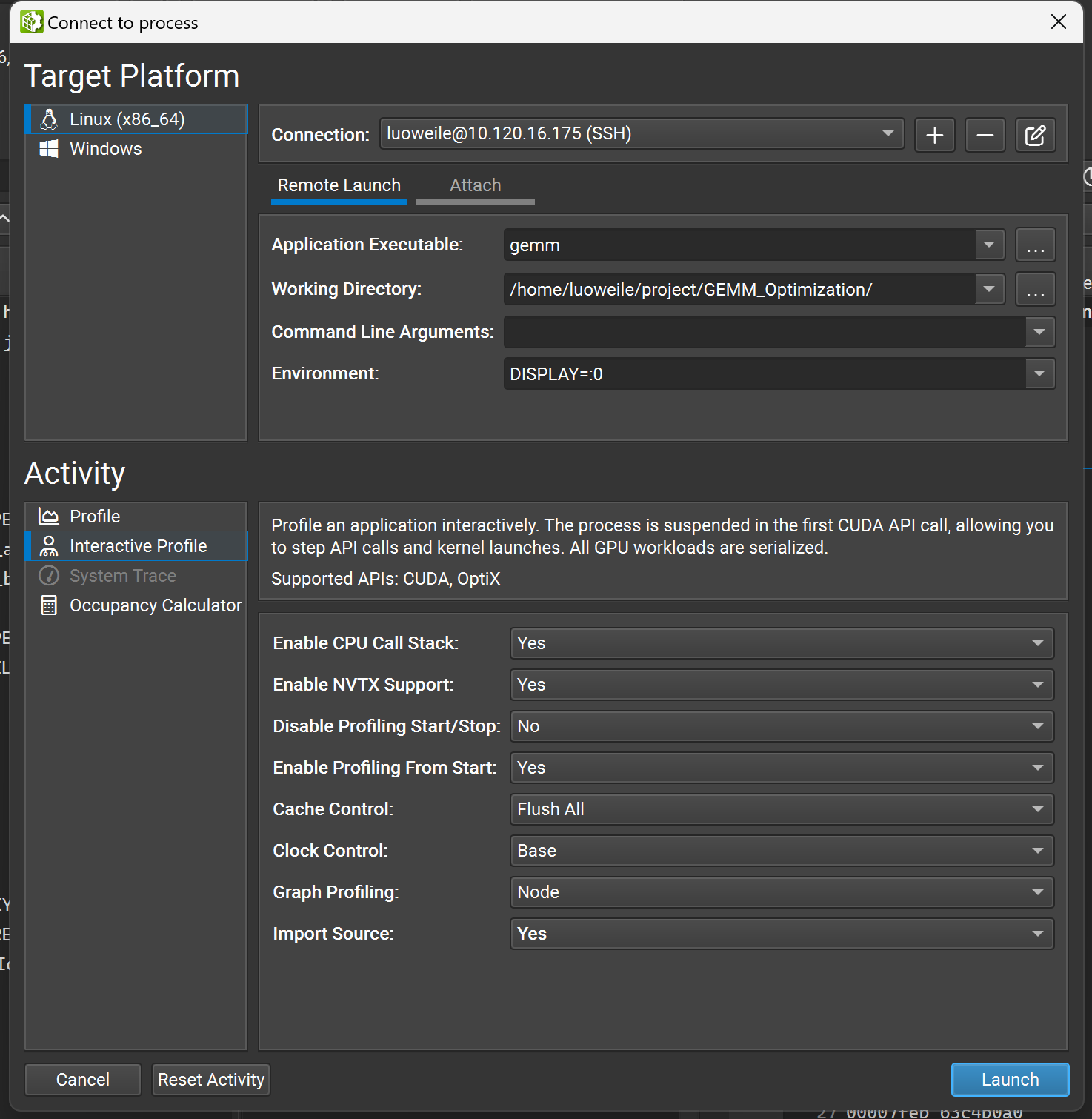
Nsight Compute is a Kernel-level profiler. Collecting all metrics may require many replays, so start with high-level sections and add targeted metrics.
4.1 Stable Collection and Source Mapping
Build optimized code with line information:
|
|
Profile selected launches:
|
|
Use --set full only when broad collection is necessary. Metric replay can execute the Kernel multiple times, so the workload must be repeatable and the GPU should not be shared with unrelated processes.
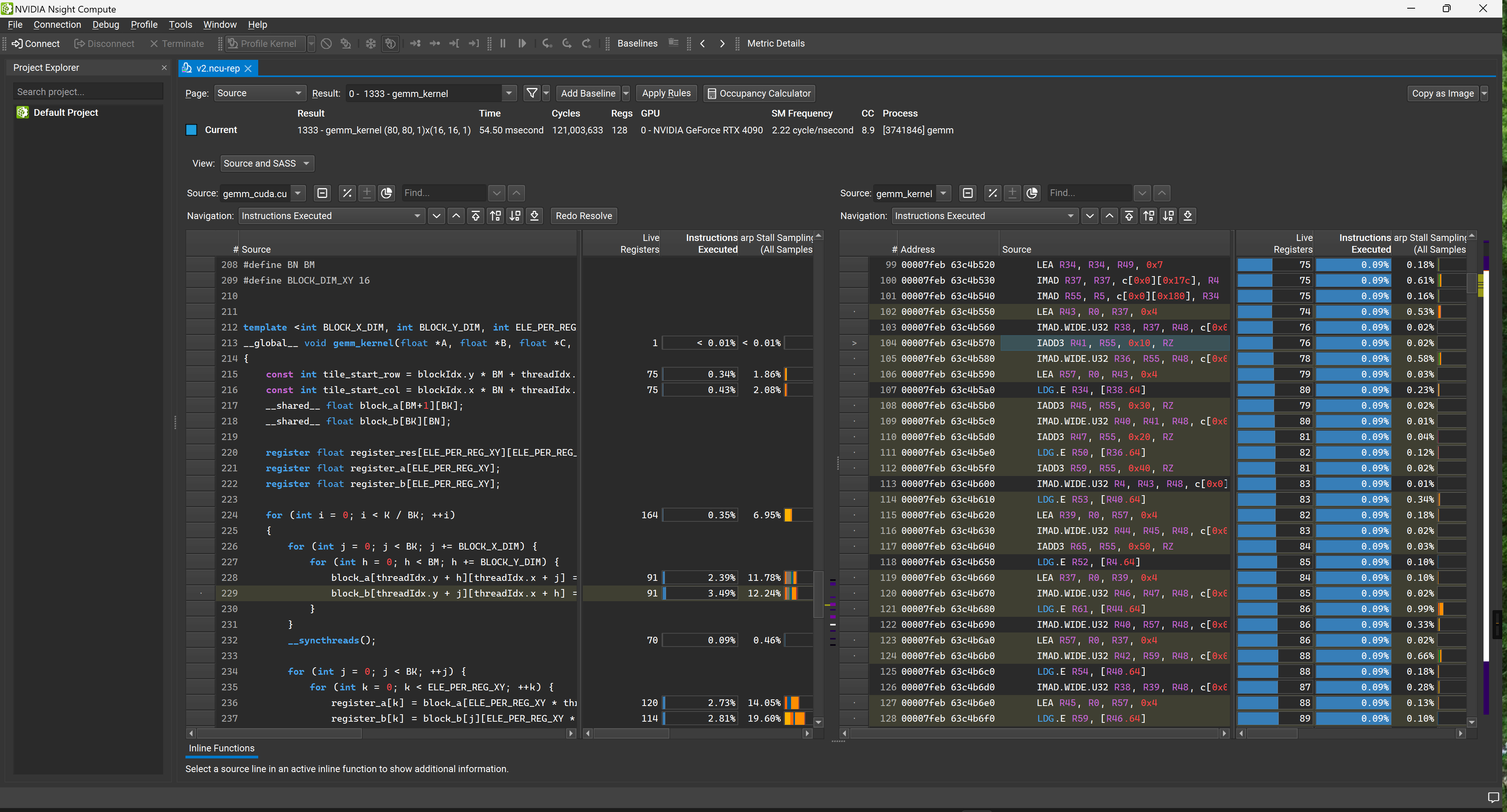
.ncu-rep in the GUI-lineinfo maps SASS back to CUDA C++ and PTX without disabling optimization:
5. A Reusable Top-Down Analysis Order
5.1 Step 1: Validate Duration and Launch
Check:
- whether Kernel duration is stable;
- whether the grid is large enough to cover all SMs;
- wave quantization and tail effects;
- block size, registers, and Shared Memory limiting concurrency.
If the workload is too small, cache hit rates and stall statistics may not be representative.
5.2 Step 2: Compute or Memory?
Use Speed of Light / Roofline:
- DRAM/L2 throughput near peak suggests memory traffic and access-pattern investigation.
- A compute pipeline near peak may indicate compute-bound execution.
- Both low suggests latency, dependencies, synchronization, instruction supply, or insufficient workload.
Do not replace current-GPU metrics with old static throughput tables. The original pipe_utilization.png only covers Compute Capability 2.0–3.5 and is no longer used for conclusions about modern GPUs.
5.3 Step 3: Is the Scheduler Actually Starved?
Inspect per-Scheduler:
- Active Warps;
- Eligible Warps;
- Issued Warps / issue active;
- skipped issue slots.
If the scheduler issues nearly every cycle, high stall percentages may not matter. Investigate stall reasons only when issue slots are frequently idle.
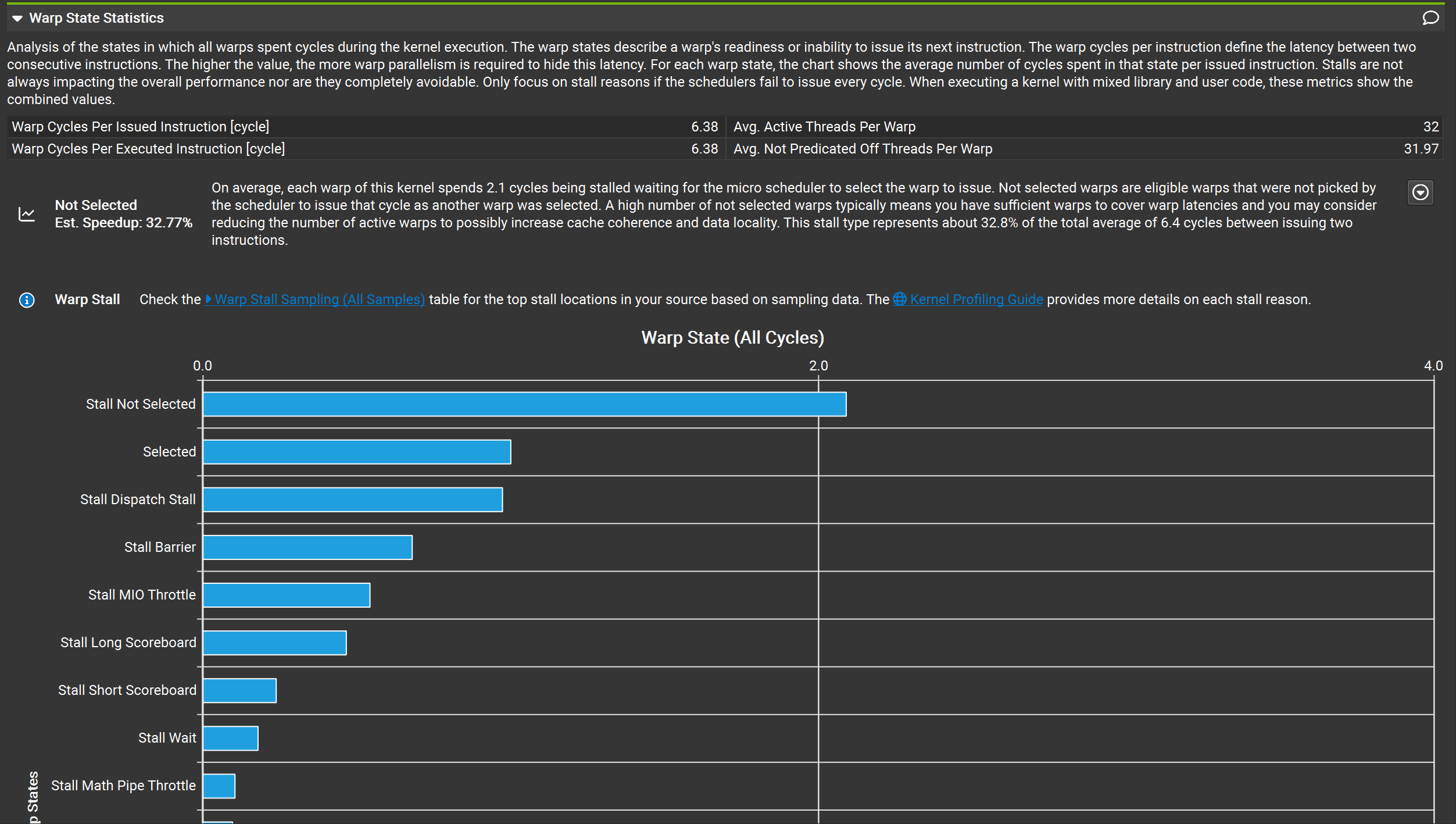
The x-axis is Warp Cycles per Issued Instruction, not time percentage. Not Selected means the Warp was Eligible but another Warp issued this cycle. It is often healthy when issue slots remain busy.
5.4 Step 4: Map Stall Reasons to Instructions
Stall reasons are symptoms, not automatic optimization advice. Names and details vary by architecture and NCU version; use the report tooltip and current Nsight Compute Profiling Guide.
Common categories:
- Long Scoreboard: long L1TEX-related dependencies, such as Global/Local/Texture loads.
- Short Scoreboard: shorter scoreboard dependencies, potentially from MIO, Shared, or Constant paths depending on architecture.
- LG Throttle: Local/Global instruction queues cannot accept more work; inspect load/store frequency, spilling, and access patterns.
- MIO Throttle: MIO instruction queues are busy, potentially due to Shared Memory, special functions, or other MIO paths.
- Math Pipe Throttle: the target math pipeline is busy; only high pipeline utilization tells us whether compute is near its ceiling.
- Barrier: Warp waits at a barrier, often exposing block-level workload imbalance.
- Membar: waits for memory-barrier-related outstanding operations; it is not the same as
__syncthreads(). - Branch Resolving: waits for a branch target/program-counter update, not every form of branch divergence.
- No Instruction: the front end temporarily has no instruction, potentially due to fetch/cache or control flow.
Then use the Source page to identify the SASS instruction that contributes most and map it back to PTX/CUDA. Do not respond to long_scoreboard by automatically adding Shared Memory; staging data used only once may cost more.
6. Three Typical Diagnosis Paths
6.1 Low Issue + High Long Scoreboard
Check:
- which load consumer stalls in Source/SASS;
- L1/L2 hit rate and DRAM sectors;
- coalescing and pointer chasing;
- independent work available for latency hiding;
- whether prefetching or Shared Memory staging enables reuse.
6.2 Low Issue + High Barrier
Check work balance before the barrier, block size, and whether synchronization can be reduced or narrowed with Cooperative Groups. Higher occupancy does not fix imbalance inside one Block.
6.3 High Issue + High Compute-Pipeline Utilization
The Kernel may already be close to the target pipeline ceiling. A stall does not necessarily need fixing; compare measured FLOPS/instruction throughput with the theoretical limit and determine whether the benchmark achieved its goal.
7. From Part 1 to Part 2
This article established the evidence chain:
|
|
The next article builds on it to measure ALU throughput and DRAM bandwidth, and to construct Hopper asynchronous pipelines with Inline PTX, WGMMA, and TMA.